Mechanical keyboards look like a rabbit hole (because they are), but you don’t have to fall into it. As a beginner, you only need to get two things right: the layout you’ll enjoy using and the switch type that matches how you type and play. Everything else is optional seasoning.
I’ve helped friends pick their first mech boards, and the ones who ended up happiest didn’t buy the “most hyped” keyboard. They bought the one that felt right for their hands and their room (especially if other humans have to hear it).
Here’s how to pick switches and a beginner-friendly keyboard without overthinking it.
First, understand the three main switch “feels”
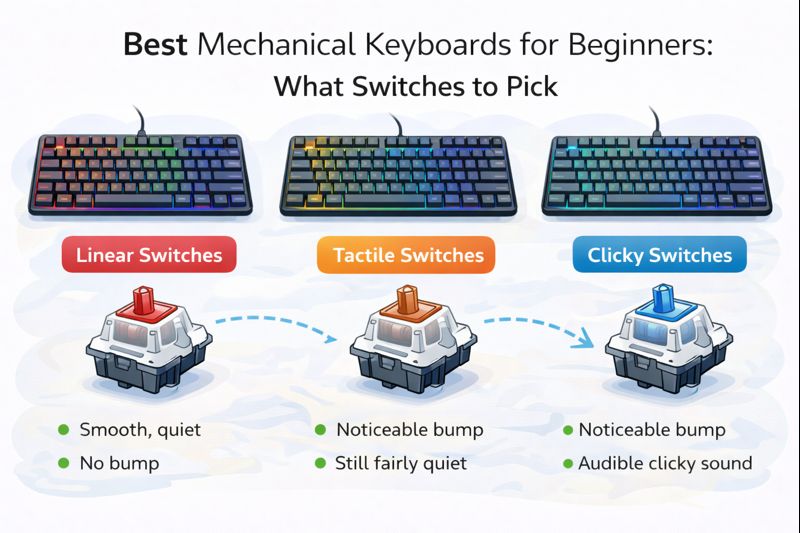
1) Linear switches (smooth, no bump)
How they feel: Press = smooth down and up, no tactile feedback.
Best for: Gaming, fast repeated key presses, people who like a “buttery” feel.
Watch out for: It’s easy to make typos at first because there’s no bump telling you “you pressed it.”
If you want one safe pick for gaming and general use: linear is usually it.
2) Tactile switches (a bump, but not clicky)
How they feel: You feel a bump partway down that helps you know a key press registered.
Best for: Typing, schoolwork, mixed use, people who want feedback without the loud click.
Watch out for: Some tactiles can feel “scratchy” on cheap boards, and the bump strength varies a lot.
If you want one safe pick for typing and school: tactile is the easiest recommendation.
3) Clicky switches (bump + loud click sound)
How they feel: Tactile bump plus an audible click.
Best for: People who love that classic mechanical click and don’t share a room.
Watch out for: They can be loud enough to annoy family, roommates, and anyone on voice chat.
Clicky switches are fun… until someone asks you to stop typing.
What switch “weight” means (and why it matters)
Switches have different actuation forces (how hard you press). Beginners often buy switches that are too heavy, then wonder why typing feels tiring.
Simple rule:
- Light to medium is best for beginners
- Heavy is for people who already know they like it
If you type a lot and your fingers feel tired, go lighter. If you accidentally press keys while resting your hands, go a bit heavier.
The easiest beginner switch picks (no drama)
If you don’t want to think too much, choose based on your situation:
If you share a room or do online classes/calls
Pick tactile or quiet linear.
You’ll get a nice feel without broadcasting every sentence.
If you mostly game (FPS, action, rhythm)
Pick linear.
It’s smooth, fast, and common in gaming-focused boards.
If you do lots of writing and want accuracy
Pick tactile.
The bump helps reduce accidental presses and feels satisfying for long typing sessions.
If you love loud, satisfying clicks
Pick clicky, but only if you’re sure your environment can handle it.
Common switch examples (so the names make sense)
You’ll see these “colors” a lot:
- Red = linear (smooth)
- Brown = tactile (bump)
- Blue = clicky (loud click)
It’s not universal, but it’s common enough to use as a beginner shortcut.
Hot-swappable vs fixed switches: the beginner superpower
If you’re not sure what you like, buy a keyboard that’s hot-swappable. That means you can pull switches out and try different ones later without soldering.
Pros: You can change the feel later, easy upgrades
Cons: Usually costs a bit more
For beginners, hot-swap is the closest thing to “future-proof.”
Other beginner-friendly features that matter more than you think
Layout choice (this changes your whole experience)
- Full-size: includes numpad, big footprint
- TKL (tenkeyless): no numpad, more mouse space (great for gaming)
- 75% / 65%: compact but still practical
- 60%: very small, but relies more on shortcuts
If you game and want desk space: TKL or 75% is a sweet spot.
Stabilizers (spacebar rattle)
Cheap boards often have rattly spacebars. Better stabilizers make the keyboard feel more “premium” than the switch type alone.
Sound and “feel” come from more than switches
Case design, keycaps, and stabilizers all affect sound. Don’t assume a switch will sound the same in every keyboard.
My simple beginner recommendations (based on real life)
If you want the easiest path:
- Best all-around beginner feel: tactile (brown-style)
- Best for gaming and smoothness: linear (red-style)
- Only if you want loud and classic: clicky (blue-style)
- If you’re unsure: buy hot-swappable and start with tactile or light linear
Quick mistakes to avoid
- Buying clicky switches for a shared room (you’ll regret it)
- Choosing the smallest layout (60%) without knowing you like shortcuts
- Obsessing over hype instead of comfort and noise level
- Ignoring return policies (your fingers can’t read spec sheets)
The final advice I give every beginner
Your first mechanical keyboard is not your “forever keyboard.” It’s your first step. Pick a layout you’ll enjoy daily, choose switches that fit your environment, and prioritize comfort over internet hype. If you nail those, you’ll love the experience even if you never mod a single thing.
If you tell me: 1) do you share a room, 2) do you game a lot, and 3) do you want quiet or don’t care about noise, I can recommend the best starter switch type in one line.