If you’re building a smart home from scratch, it’s tempting to start with the fun stuff: voice assistants, fancy light scenes, and gadgets that make your house feel like a sci-fi set. I’ve been there. I’ve also been the guy standing in the hallway at 11:40 pm whispering “turn off the lights” while the assistant pretends it suddenly forgot English.
A smart home that actually feels smart is built on three things: a solid network, a reliable ecosystem, and devices that solve real problems. Here’s what I’d buy first, what I’d delay, and what I’d skip unless you enjoy troubleshooting as a hobby.
Start with the boring foundation
1) A good wi-fi setup (or wired where it matters)
Everything smart relies on your network. If your wi-fi is shaky, your smart home will be, too. Before buying a pile of devices, make sure you have:
- Strong coverage where devices will live (door, living room, bedrooms)
- A router that can handle many connections without falling over
- A guest network option (useful for visitors and some IoT setups)
If you already know your home has dead zones, consider a mesh system early. It’s not the most exciting purchase, but it prevents a lot of “why is the doorbell offline again?” drama.
2) Pick your ecosystem once
This is where people waste money. Decide what “brain” you want:
- Apple Home (good if you’re deep in iPhone/Apple Watch)
- Google Home (solid voice control, simple setup)
- Amazon Alexa (wide device support, lots of routines)
Also pay attention to Matter support. Matter is a newer standard that helps devices work across ecosystems more smoothly. If you can, prioritize devices that support Matter to keep future-you happy.
My rule: pick one main ecosystem, then only “mix and match” when you know exactly why.
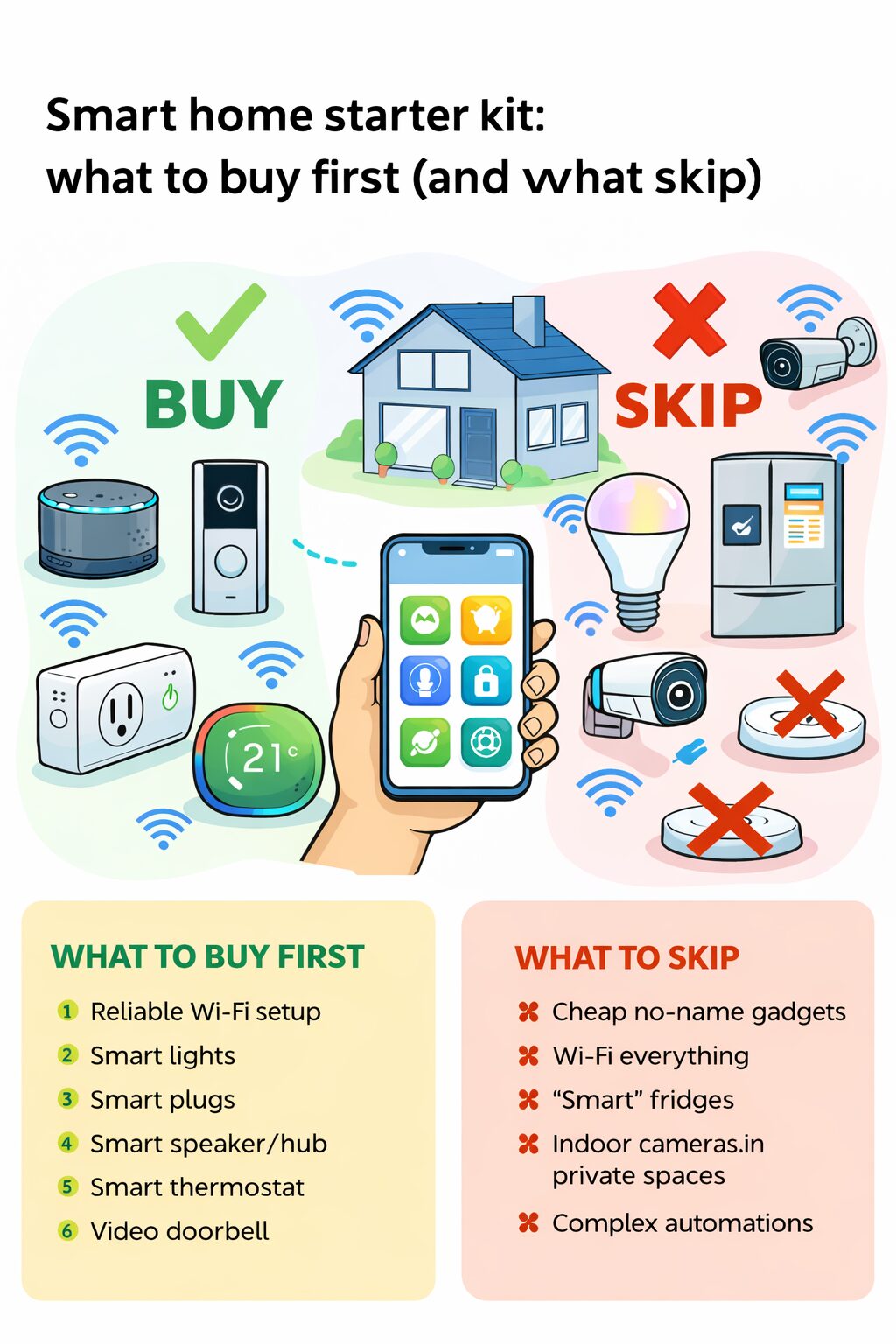
What to buy first: the best early wins
1) Smart lights (but start small)
Smart lighting gives you the biggest “wow” per dollar when done right. Start with one room you use constantly: living room or bedroom.
Best first options:
- Smart bulbs if you rent or want quick install
- Smart switches if you own your place and want the wall switch to still work normally
Bulbs are easy, but switches are cleaner long-term. If you go bulbs, remember: someone turning off the physical switch kills power, and then your “smart” bulb becomes… a regular sad bulb.
2) Smart plugs
Smart plugs are the secret weapon of starter kits:
- Lamps become smart instantly
- Fans become controllable (on/off)
- Coffee maker schedules (if the switch is a simple toggle type)
They’re also a low-risk way to learn automations without rewiring anything.
3) A smart speaker or hub (one is enough)
One hub/speaker in a central spot is plenty to start. Use it for:
- Voice control
- Routines (“good night” shuts down lights and plugs)
- Timers, reminders, quick control without grabbing your phone
If your ecosystem offers a dedicated hub (or hub functions built into a speaker), it often improves reliability, especially for Zigbee/Thread devices.
4) A smart thermostat (only if it fits your home)
If your heating/cooling system is compatible, a thermostat can save money and adds real comfort. But compatibility can be tricky, and installation isn’t always beginner-friendly.
Buy early if:
- You have central HVAC
- You want scheduling and energy reports
- You’re ready to do a bit of setup
Skip for now if:
- You rely mostly on window AC units
- Your building has shared/locked thermostat control
5) A video doorbell (if you actually need it)
Doorbells are useful if you get deliveries or want basic security. But they can be the most annoying to set up because they depend on:
- Good wi-fi at the door
- Sometimes existing doorbell wiring
- Cloud subscriptions for recordings
If your wi-fi is weak near the door, fix that first or you’ll buy a “smart doorbell” that spends its life buffering.
What to buy next: upgrades that make things feel polished
1) Motion sensors and contact sensors
These turn “cool gadgets” into “smart home that anticipates you.”
- Motion sensor triggers hallway lights at night
- Door/window sensor notifies you if something is left open
- Closet lights that turn on automatically (my favorite low-effort luxury)
These are especially nice in homes with kids, pets, or anyone who forgets switches exist.
2) Smart locks (with caution)
Smart locks are convenient, but they’re also a front door, so reliability matters more than fun.
Buy when you’re ready to:
- Maintain batteries
- Set up backup access (keypad, physical key, or both)
- Test automations carefully
I recommend starting with a lock that still works great as a normal lock even if the “smart” part has a bad day.
3) A couple of smart blinds or curtains (not all at once)
They’re awesome, but expensive. Start with one window that matters: bedroom or office. If you love it, expand later.
What to skip (at least at first)
1) Cheap no-name devices with random apps
If it requires a sketchy third-party app, asks for weird permissions, and has a brand name that looks like someone sat on a keyboard, skip it. These devices often:
- Disconnect a lot
- Get abandoned by the manufacturer
- Create security headaches
2) Wi-fi everything
Wi-fi devices are fine in moderation, but a house full of cheap wi-fi gadgets can clog your network. For sensors, consider ecosystems that use Zigbee or Thread when possible. They’re usually more stable and sip battery.
3) Smart fridges, “smart” toasters, and novelty appliances
Unless you have a very specific need, these are often expensive and underwhelming. The smartest thing your fridge can do is stay cold reliably.
4) Indoor cameras in private spaces
This is less about tech and more about comfort. Many people buy them, then unplug them because it feels weird. If you do use cameras, put them in common areas or pointed at entry points, and make sure privacy settings are solid.
5) Overcomplicated automations on day one
Start with simple routines that you can explain in one sentence. If you build a chain reaction of “if motion, but only after sunset, unless the TV is on, except Tuesdays,” it will break and you’ll forget why.
My recommended starter kit (simple and reliable)
If you want a clean first shopping list, here’s what I’d do:
- One smart speaker/hub (your chosen ecosystem)
- 2–4 smart bulbs or 1–2 smart switches (one key room)
- 2 smart plugs
- 2 motion sensors (hallway + entry or bedroom)
- 2 contact sensors (front door + a window/door you care about)
Then live with it for a week. You’ll quickly discover what annoys you most: forgetting lights, coming home with hands full, temperature swings, or wanting better security. That’s how you decide the next purchase without wasting money.
A final rule that saves you cash
Buy devices to solve problems, not to collect gadgets. The best smart home setup is the one you stop thinking about because it just works.